
1. The Problem: Too Many Alerts, Too Little Context
Modern cybersecurity teams face a common challenge: they collect enormous amounts of security data but often struggle to turn it into actionable intelligence. A Security Operations Center (SOC) can generate hundreds or even thousands of alerts every day. Many of these alerts are repetitive, low-risk, or false positives. As a result, analysts spend significant time reviewing logs instead of investigating actual threats.
This challenge inspired me to build CyberGuard AI, a personal cybersecurity project that combines traditional detection techniques with artificial intelligence to help security analysts quickly understand and respond to potential attacks.
The goal was simple: Transform raw security logs into meaningful security insights through automation and local AI analysis.
Project Goal
Transform raw security logs into meaningful security insights through automation and local AI analysis.
2. Project Vision
CyberGuard AI was designed as a lightweight Security Operations Center (SOC) platform that can:
Detect suspicious activity from log files
Store security events for future investigation
Visualize threats through an interactive dashboard
Use AI to explain threats and recommend actions
Keep sensitive data private by running AI locally
Rather than replacing security analysts, the project focuses on augmenting them by reducing manual investigation time.
3. System Architecture
The project follows a straightforward security monitoring workflow:
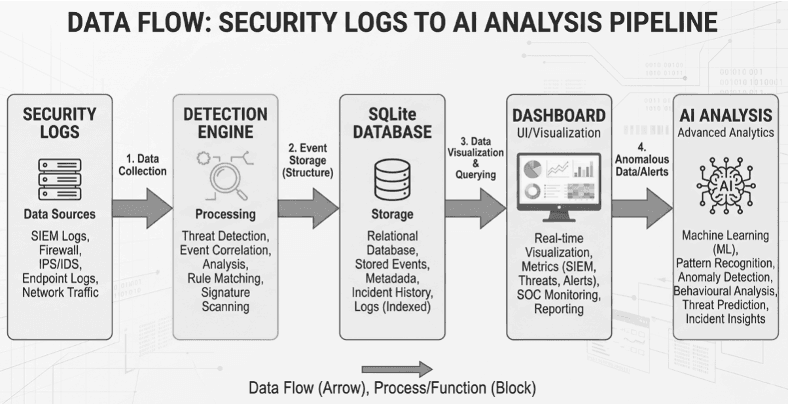
Each stage adds additional value to the data until a simple log entry becomes a security recommendation.
3.1 Phase 1: Building the Detection Engine
Every security platform starts with visibility. To simulate real-world authentication activity, I created a log file containing login events, including successful and failed authentication attempts. The first challenge was identifying suspicious behavior.
Detecting Brute Force Attacks
One of the most common attack techniques is a brute force attack, where an attacker repeatedly attempts to guess passwords. CyberGuard AI monitors failed login attempts and tracks how many times each IP address appears in the logs. When an IP exceeds a predefined threshold of failed attempts, the system generates a security alert.
For example:
| Source IP | Failed Attempts | Result |
|---|---|---|
| 192.168.1.50 | 6 | Alert Generated |
| 192.168.1.75 | 2 | No Alert |
This simple detection mechanism demonstrates how meaningful security events can be extracted from otherwise noisy log data.
3.2 Phase 2: Creating a Security Audit Trail
Initially, alerts were displayed directly in the terminal. While this approach was useful for testing, it has a major limitation. Once the program stops running, the alert history would disappear.
To solve this problem, SQLite is integrated as a lightweight security event database. Every alert generated by the detection engine is stored with; timestamp, alert type, severity level, source IP and number of attempts.
This transformation enabled the project to move from a simple script to a system capable of maintaining historical records.
This matters because persistent storage allows security teams to:
- 1. Identify recurring attackers
- 2. Analyze attack trends
- 3. Generate reports
- 4. Maintain audit records
- 5. Support compliance requirements
Instead of asking, "What happened today?", analysts can begin asking, "What patterns have emerged over time?"
3.3 Phase 3: Building a SOC Dashboard
Security data becomes far more valuable when it is visualized. To make the alert data easier to interpret, an interactive dashboard was built using Streamlit. The dashboard provides an immediate overview of the organization's security posture.
Instead of reviewing rows of data manually, users gain situational awareness within seconds.
Dashboard Features
At a glance, users can view; total alerts detected, high-severity incidents and recent activity levels
A dedicated section highlights the most active sources of suspicious activity. This helps prioritize investigation efforts and quickly identify recurring offenders.
Charts and visual summaries reveal trends that are difficult to spot in raw database tables. Analysts can immediately understand; alert frequency, severity distribution and attack concentration.
3.4 Phase 4: Introducing the AI Security Analyst
While dashboards help visualize threats, analysts still need to answer critical questions:
What does this alert mean?
How serious is it?
What should happen next?
This is where AI becomes valuable. CyberGuard AI integrates a locally hosted Large Language Model using Ollama and Llama 3.2:3b.
This local AI is implemented because many organizations hesitate to send security data to cloud-based AI services. Running the model locally provides several benefits:
Turning Alerts into Intelligence
A raw alert may look like this:
| Alert Type | Source IP | Attempts |
|---|---|---|
| Brute Force Attack | 192.168.1.50 | 6 |
For a junior analyst, this information raises several questions. CyberGuard AI automatically converts the alert into a concise security assessment.
The AI responds using a structured format:
A brief explanation of what happened.
An assessment of the risk level.
Industry-standard classification of the attack technique.
Practical steps security teams should take immediately.
This transforms technical data into actionable guidance.
3.5 Challenges and Lessons Learned
Building CyberGuard AI taught me several important lessons:
1. Security Data Is Only Valuable When Context Exists
Raw logs are not intelligence. Meaningful analysis requires detection logic, historical storage, and interpretation.
2. Simplicity Often Wins
A straightforward brute-force detection rule can still uncover legitimate security concerns. Complexity is not always necessary.
3. AI Works Best as an Assistant
The most effective role for AI is helping analysts understand and prioritize information rather than replacing human decision-making.
4. Privacy Matters
Local AI deployment offers a practical balance between automation and data protection.
3.6 Future Enhancements
CyberGuard AI is an ongoing project, and several improvements are planned:
These enhancements would move the platform closer to a production-grade SOC solution.
3.7 Conclusion
CyberGuard AI began as an experiment to explore the intersection of cybersecurity and artificial intelligence. What emerged was a complete security workflow capable of detecting suspicious activity, preserving historical evidence, visualizing threats, and generating AI-powered security guidance.
The project reinforced an important lesson; The future of cybersecurity is not just collecting more data. It is helping people understand that data faster, more accurately, and with greater context.
By combining traditional detection techniques with local AI, CyberGuard AI demonstrates how modern security operations can become more efficient, scalable, and intelligent without sacrificing privacy.
CyberGuard AI • Cybersecurity & Artificial Intelligence